TL;DR
- Next.js is built on React, so it isn’t a straight choice. React draws the interface; Next.js adds routing, server rendering and data fetching around it.
- React’s own docs recommend starting a new app with a framework, and list Next.js first.
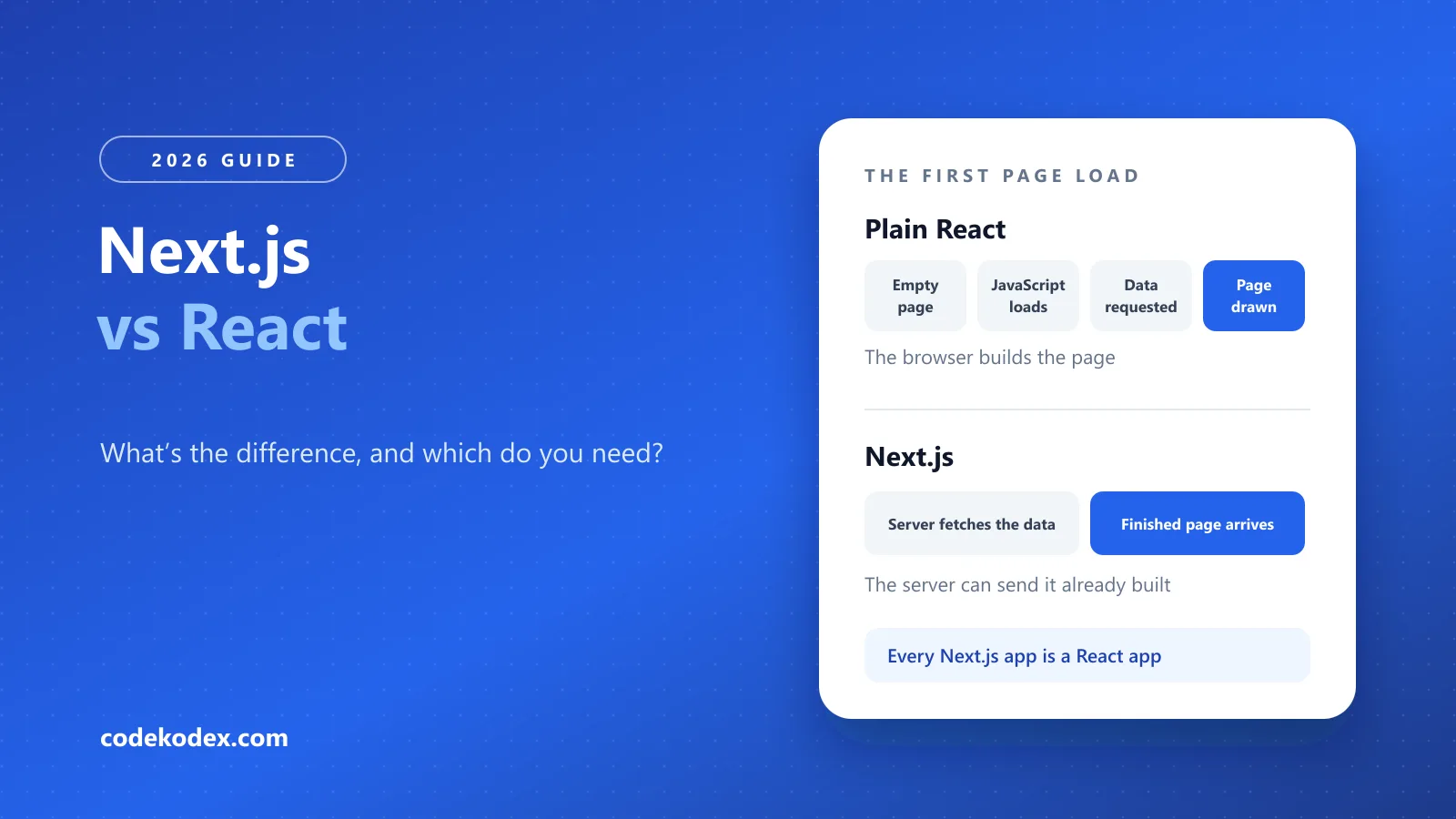
- The difference you’ll feel: plain React builds the page in the visitor’s browser, while Next.js can send it already built.
- Choose plain React for tools that live behind a login. Choose Next.js for public sites that need to load fast and be found on Google.
- Next.js costs you a server (or a host that runs one), more ideas to learn and a version to keep up to date.
Next.js vs React isn’t a straight choice, because Next.js is built on React. React is a library for building interfaces, and Next.js is a framework that adds routing, server rendering and data fetching around it. React’s own docs recommend starting a new app with a framework, and list Next.js first. So the real question is whether your project needs a framework, and for most public websites it does.
This guide is for developers and for the founders and managers who hire them. There’s some code, and each example is explained in plain English.
The difference in one sentence
#React decides what your page looks like. Next.js decides where and when it gets built. The Next.js team’s own definitions say the same: React is “a JavaScript library for building interactive user interfaces”, and Next.js is “a React framework that gives you building blocks to create web applications” (Next.js Learn).
Every Next.js app is a React app, so Next.js is a layer on top of React rather than a rival to it. Comparing them directly is a bit like comparing an engine with a car.
What React leaves to you
#React is very good at one job: turning your data into an interface and keeping the screen in step when the data changes. The decisions around that job are left to you, or to a framework.
- Routing: React has no idea of pages or web addresses, so you add a router
- Server rendering: possible with React alone, but you set it up and maintain it
- Data fetching: where data comes from, and when, is up to you
- Build tooling: bundling and code splitting are your configuration
- Images and fonts: sizing and loading are up to you
- Page titles, canonical tags and sitemaps: React has no view on them
React’s docs are open about the trade. Building from scratch, they say, “gives you more flexibility, but does require that you make choices on which tools to use for routing, data fetching, and other common usage patterns” (react.dev).
Next.js vs React compared
#Plain React and Next.js compared
| Plain React | Next.js | |
|---|---|---|
| Routing | Partly Add a router library and configure it | Yes Folders define the web addresses, with shared layouts |
| First page load | Partly An empty shell, then JavaScript draws the content | Yes The server can send the finished page |
| Showing up on Google | Partly Google has to render the JavaScript first | Yes Google gets the finished HTML |
| Server code | No A separate backend project | Yes Route handlers live in the same project |
| Hosting | Yes Any static file host | Partly A Node.js server, Docker or a supporting platform for every feature; a static export runs anywhere, with fewer |
| Things to learn | Yes A smaller set of ideas | Partly Server and client components, caching and rendering modes, on top of React |
Scroll sideways to compare.
On Google: it processes JavaScript sites in three phases (crawling, rendering and indexing), and its guidance says “server-side or pre-rendering is still a great idea because it makes your website faster for users and crawlers” (Google Search Central, 2026). Hosting options come from the Next.js deployment docs.
The same page, built two ways
#This is the difference you’ll actually feel. Both versions show the same product page. Only the order of events changes.
The same product page in plain React and in Next.js
// The browser loads the page, then asks for the data.import { useEffect, useState } from 'react';
function ProductPage({ slug }) {  const [product, setProduct] = useState(null);
  useEffect(() => {    fetch(`/api/products/${slug}`)      .then((res) => res.json())      .then(setProduct);  }, [slug]);
// What a slow phone, and Google, see first if (!product) return <Spinner />; return <ProductDetails product={product} />;}// app/products/[slug]/page.jsx// Runs on the server: the data is in place before the page is sent.export default async function ProductPage({ params }) { const { slug } = await params; const product = await getProduct(slug);
return <ProductDetails product={product} />;}- Google sees the product straight away, not a loading spinner.
- A visitor on a slow connection doesn’t wait for the JavaScript to download and run before the data is even requested.
- The data request runs on the server, close to the database, instead of from the visitor’s phone.
Key takeaway
Next.js runs React, so it can’t be faster than React as such. What it can do is take a round trip out of the first page load. If everyone using the app is already logged in and nothing needs to rank, that’s worth very little.
What you give up with Next.js
#Next.js
What it gives you, and what it costs, next to plain React
Good for
- Pages Google can read straight away, with titles and canonical tags built in
- Routing, image handling and server code in one project
- Each page can be prebuilt, rebuilt on a schedule or built on request
Watch out for
- Every feature needs a Node.js server, Docker or a platform that supports them, where plain React can sit on any static host
- More to learn: server and client components, caching and the rules for each
- Code runs in two places, so a bug can be on the server or in the browser
- A version to keep current: each one gets security fixes for a set time (Next.js support policy)
Suits: Public sites that need to load fast and be found on Google
When to choose plain React, and when Next.js
#Plain React is the better fit if
0 of 5 completed
Next.js is the better fit if
0 of 5 completed
If it’s close, the tie-breaker is whether any part of the site needs to be found by someone who hasn’t heard of you yet. Sometimes the answer is both: a public site in Next.js and a separate app behind the login.
Moving a React app to Next.js
#Your components mostly come across as they are. What changes is the structure around them: routing moves to folders, data fetching can move from the browser to the server, and any code that touches the browser window has to be marked as client code.
If the app has public pages with Google rankings, the addresses matter more than the code. Keep the same URLs, or redirect every old one to its new home. It’s the same job as in any website redesign.
Is Next.js replacing React?
#No. Next.js runs React, so every Next.js site is a React site. What has changed is how new React projects start. React’s documentation now recommends a framework, with Next.js listed first, and suggests building from scratch for apps with unusual needs or for learning the basics.
Frequently Asked Questions
#Is Next.js replacing React?
No. Next.js is built on React, so every Next.js app is a React app. What has changed is how new projects start: React’s documentation recommends using a framework and lists Next.js first. Building with React alone is still an option for apps with unusual needs, or for learning the basics.
Should I learn React before Next.js?
Yes. Components, props, state and effects work the same way in Next.js, so you need them either way. Learn React first, then add Next.js for routing, server rendering and data fetching. React’s own docs suggest building a React app from scratch if you want to learn the basics.
Is React or Next.js better for SEO?
Next.js, for public pages. It can send Google finished HTML, while a plain React app needs Google to render its JavaScript first. Google says server-side or pre-rendering “is still a great idea”. Plenty of React sites rank, but the framework removes a risk. It can’t fix thin or slow pages.
Can Next.js build a fully static site?
Yes. A static export turns a Next.js site into HTML, CSS and JavaScript that runs on any web server. You lose the features that need a server, such as building pages on request. For a small site that rarely changes, plain HTML or WordPress may be simpler for whoever looks after it.
Which is better for a startup MVP?
Usually Next.js, because most startups soon need public pages: a homepage, pricing and a blog that should rank. Keeping those in the same project as the app saves adding a second stack later. If the MVP is a tool entirely behind a login, plain React may ship sooner.
Building a site and weighing the two?
Tell us what you’re building. We’ll tell you which parts belong in Next.js, which don’t, and what a fixed-price build would cost. Websites start at £400.
Sources
Definitions of React and Next.js — Next.js
React Foundations
Starting a React app with a framework — React
Creating a React App
React and Next.js usage — Stack Overflow
2025 Developer Survey, web frameworks
How Google processes JavaScript — Google Search Central
JavaScript SEO basics
Hosting options — Next.js
Deploying, 2026
Version support — Next.js
Support policy
- #next js vs react
- #react
- #next.js
- #server rendering
- #web development