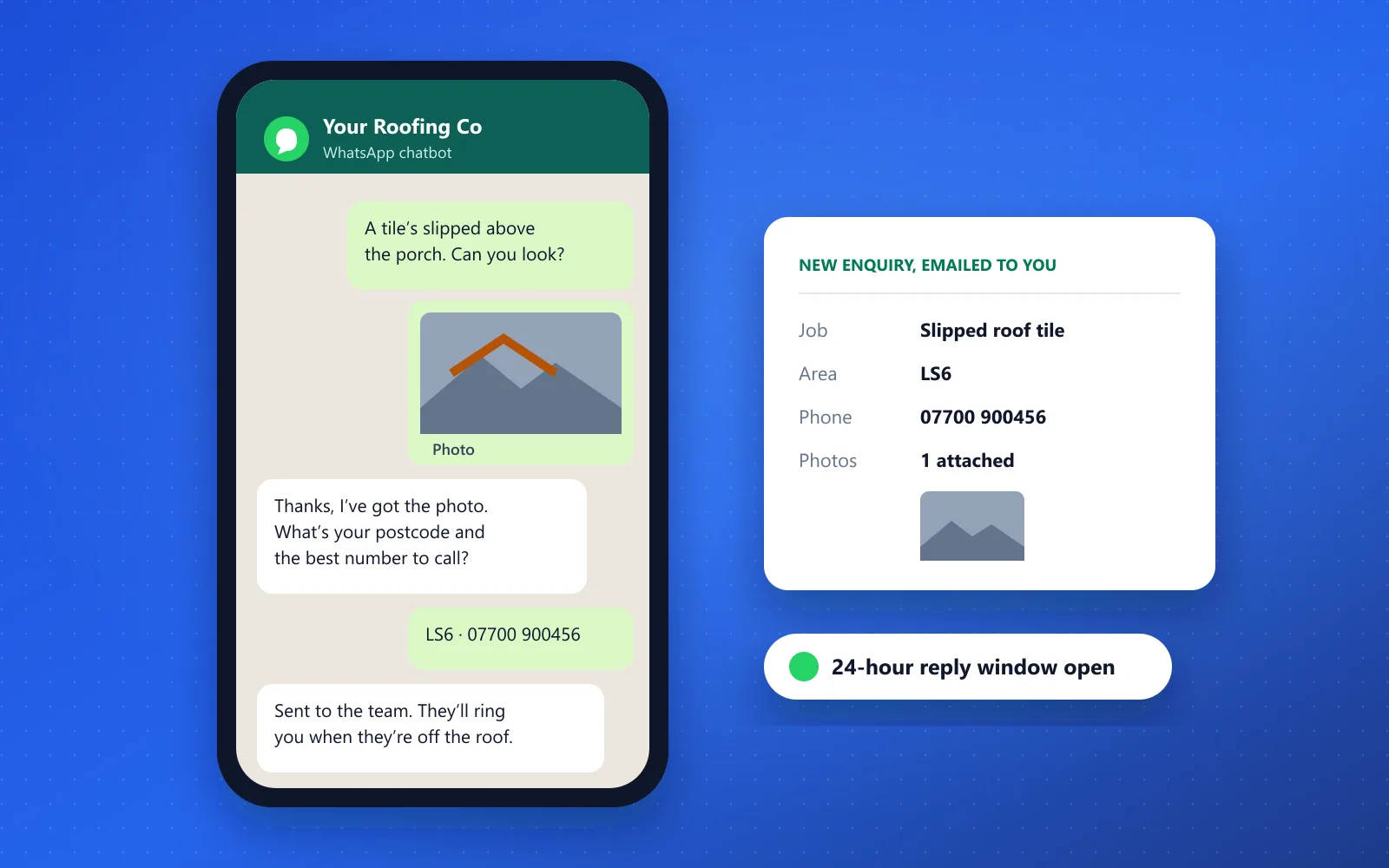
A WhatsApp chatbot answers your customers’ questions in WhatsApp, takes their details and any photos of the job, and emails you the lead while you work. Ours costs from £900 + £69/mo, with Meta’s per-message fees passed on at cost. It works in text only, and anything it can’t answer comes to you.
A WhatsApp chatbot replies to customers who message your business on WhatsApp. It answers from your own website and FAQs, asks the questions you’d ask, and emails you the lead. The customer gets an answer straight away, and you call back when you’re off the job.
Our WhatsApp Bot does what our website Enquiry Bot does, on WhatsApp and your website at the same time.
Answers the common questions: areas you cover, how quoting works, opening hours, what a service includes
Takes the customer’s name, number, postcode and job details
Puts any photos the customer sends into the lead email
Sends your booking link when someone wants to book a call or an appointment
Hands over to you when it doesn’t know, or when the customer asks for a person
Example Roofing Co.WhatsApp chatbot
Customer: Hi, a tile’s slipped above our porch. Photo attached.
Chatbot: Thanks for the photo. Which area are you in?
Customer: Headingley, LS6
Chatbot: We cover Headingley. What’s the best number for a call back?
Customer: 07700 900456
Chatbot: Got it. I’ve sent your details and the photo to the team. They’ll ring you when they’re off the roof.
New WhatsApp enquiry, emailed to you
Job
Slipped roof tile
Area
Headingley, LS6
Phone
07700 900456
Photos
1 attached
An example conversation with a fictional business. Your bot answers from your own website and FAQs.
HOW IT WORKS
How a WhatsApp chatbot works with the WhatsApp Business Platform
A WhatsApp chatbot runs on Meta’s WhatsApp Business Platform, not the WhatsApp Business app on your phone. Messages come in through the platform, the bot writes a reply from your content, and the lead goes to your inbox. Everything it can send depends on one rule, the 24-hour customer service window.
A customer messages your business
The next 24 hours
The bot can reply freely
Inside this window the bot can answer questions, ask for details and send your booking link. Each new message from the customer restarts the clock. As of October 2026, Meta gives each business number 1,000 free service replies a month, then charges per message.
After 24 hours
Only template messages can go out
Once the window closes, you can only send messages Meta has approved as templates, such as reminders and follow-ups. The customer must have opted in, and Meta charges for each one. Reminders aren’t part of the WhatsApp Bot. We quote them as an add-on.
Your WhatsApp number
Meta lets some businesses keep the WhatsApp Business app on the same number as the platform. We can’t promise it for every number, so we’ll tell you at setup whether yours can stay on the app. If it does, Meta switches off broadcast lists and disappearing messages, and group chats don’t sync.
How many people you can message first
A new account can start conversations with up to 250 people a day outside the 24-hour window. Verifying your business with Meta raises that to 2,000. Replies to customers who message you first don’t count towards it.
Meta’s rules for chatbots
Automated replies are allowed inside the window if a customer can reach a person, and you need opt-in before messaging someone first (WhatsApp Business Messaging Policy). Since February 2026, Meta’s terms bar general-purpose AI assistants. Our bots only answer questions about your business.
What a WhatsApp chatbot costs, including Meta’s fees
A WhatsApp chatbot from us costs from £900 + £69/mo. The setup fee is one-off, and the monthly fee covers hosting and AI usage up to 1,000 conversations a month. Meta’s per-message fees are separate, passed on at cost with no mark-up. The other two packages work on your website only.
Enquiry Bot
Answers questions on your website and captures enquiries while you work.
Meta’s fees: as of October 2026, each business number gets 1,000 free service replies a month. Replies past that, and template messages such as reminders, are charged per message. We don’t quote Meta’s rates because they change. They’re on Meta’s pricing page.
Reminders are a quoted add-on: they’re sent as WhatsApp template messages, need the customer’s opt-in, and Meta charges for each one.
Setup fees: 50% upfront, 50% on launch. Monthly fees are billed monthly, with 30 days’ notice to cancel. No VAT added.
Every chatbot package, the fair-use limits and what isn’t included are set out on our AI chatbot packages page.
WEBSITE OR WHATSAPP
Do you need website chat or WhatsApp?
Swipe the table to compare
Start with website chat unless your customers already message you on WhatsApp. Most people find a trade or clinic on Google and land on the website, so that’s where an AI chatbot for your website catches the most enquiries. Add WhatsApp when customers keep messaging your number anyway.
Website chat compared with a WhatsApp chatbot
What’s included
Website chat
WhatsApp chatbot
Where customers find it
On your website, after finding you on Google
In WhatsApp, from your number or a link on your site
What it collects
Name, number and job details
Name, number, job details and any photos the customer sends
Following up
You call or email back
Free-form replies for 24 hours, then paid template messages only
Trades and clinics use WhatsApp differently, so we set the bot up differently for each. A roofer wants to see the job. A clinic wants the appointment booked without anyone sharing health details in a chat.
Trades see the job before they ring
A customer sends a photo of the leak, the slipped tile or the old boiler. The bot takes their postcode and number, and the photo lands in your lead email with the details. You know what you’re quoting for before you call.
Enquiries answered while you’re on a job
Evening and weekend messages get an answer and a captured lead instead of sitting unread until you’re back in the van.
Quotes that start with the right questions
The bot asks what you’d ask: the job, the area, how soon. It doesn’t price work it can’t see. You do that when you call.
Clinic bookings at any hour
Someone asks about appointments and gets your booking link in the chat. Appointment reminders are a quoted add-on, because Meta charges for them as template messages.
A clinic bot never asks about symptoms
The bot answers practical questions such as prices, opening hours and parking, then sends people to book. It never asks about symptoms or medical history, and Meta’s policy warns against asking for health information over WhatsApp where the rules forbid it.
Answers in text from your own content, captures the enquiry and hands it to you.
What it doesn’t do
Take phone calls or voice notes, or stand in for you. Anything it can’t answer comes to you.
Setup takes about 2–3 weeks. Meta’s verification can add time.
Monthly fees are billed monthly, with 30 days’ notice to cancel.
Meta’s per-message fees are passed on at cost.
We won’t set the bot up to:
Message people who haven’t opted in
Ask clinic patients about symptoms or medical history
Quote a firm price for a job it can’t see
Keep chatting when a customer asks for a person
Before it goes live, we agree with you what the bot must never answer, and it sticks to that.
SETUP
How we set up a WhatsApp business chatbot, and how long it takes
Setup takes about 2–3 weeks from go-ahead. Meta’s business verification can add time and is outside our control. This is what happens in those weeks.
1. Number and Meta account
We set up your WhatsApp Business number and Meta account, and tell you whether your current number can stay on the WhatsApp Business app.
2. Business verification
We help you through Meta’s business verification. Meta makes the decision and sets the pace.
3. Trained on your content
The bot learns your website and FAQs, and we agree what it hands over to you.
4. Tested, then live
We test it with the questions your customers really ask, then switch it on and tune it monthly.
FAQ
WhatsApp chatbot questions
How much does a WhatsApp chatbot cost in the UK?
Our WhatsApp Bot is from £900 + £69/mo. The monthly fee covers hosting and AI usage up to 1,000 conversations a month. Meta’s per-message fees are extra, at cost. As of October 2026, each number gets 1,000 free service replies a month, and template messages such as reminders are charged for each one.
Can I keep my existing WhatsApp number?
Possibly. Meta lets some businesses use one number on both the WhatsApp Business app and the platform a chatbot runs on, but we can’t promise it for every number. We’ll tell you at setup whether your current number can stay on the app. If it can’t, we set up a number for the bot.
Do I need the WhatsApp Business API for a chatbot?
Yes. A chatbot connects through Meta’s WhatsApp Business Platform, often called the WhatsApp API, not the WhatsApp Business app on your phone. Setting up the platform account and number is part of the WhatsApp Bot, and we help with Meta’s business verification, which raises how many people you can message.
Are WhatsApp chatbots allowed?
Yes, within Meta’s rules. Automated replies are allowed within 24 hours of a customer’s message, as long as there’s a clear way to reach a person. Since February 2026, Meta’s terms bar general-purpose AI assistants from WhatsApp. A bot that only answers questions about your business and hands over to you is a different thing.
How long does it take to set up a WhatsApp chatbot?
About 2–3 weeks from go-ahead. That covers the number, the Meta account, training the bot on your website and FAQs, and testing it with real questions. Meta’s business verification can add time, and it’s outside our control, so we’ll tell you where it stands as we go.
Can a WhatsApp chatbot send appointment reminders?
Not as part of the WhatsApp Bot. A reminder goes out after the 24-hour reply window has closed, so Meta requires an approved template message, the customer’s opt-in and a fee for each message sent. We quote reminders as an add-on once we know how many you’d send.
Can customers send photos to the chatbot?
Yes. Photos a customer sends in the chat are included in the lead email, so a roofer or plumber can see the job before calling back. The bot doesn’t judge the photos or price the work from them. You do that when you ring the customer.
Does a WhatsApp chatbot use AI?
Ours does. It writes replies from your own website and FAQs instead of making customers tap through a fixed menu. When it doesn’t know the answer, it takes the customer’s details and passes them to you rather than guessing. It works in text only and doesn’t take calls or voice notes.
Set up in about 2–3 weeks
Want a WhatsApp chatbot for your business?
Tell us how customers contact you now and roughly how many messages you get. We’ll tell you whether WhatsApp, website chat or both makes sense.