
TL;DR
- Before anything changes, export the pages and searches that bring you traffic now.
- Map every old URL to its closest new page and redirect it permanently. 301 and 308 both work.
- Carry over the titles, headings and internal links of pages that rank, and keep staging out of Google with a password.
- On launch day, test the redirects for your top pages, remove any noindex and submit the new sitemap.
- Expect some movement for a few weeks. Check Search Console weekly for 30 days and keep the redirects for at least a year.
This website redesign SEO checklist is what we work through on every rebuild, so a small business keeps the Google traffic its old site earned. Most of the drops we see after a relaunch come from two mistakes: pages that moved to a new address without a redirect, and pages that used to rank and were quietly left out of the new site. Both are avoidable with a list and an afternoon of checking.
It’s written for small sites of roughly 10 to 100 pages: a trade moving off an old WordPress theme, a clinic leaving a website builder, a shop moving to a new platform. If you’re redesigning with us, this is built into our website redesign service. If you’re working with someone else, take the list to them and ask who owns each step.
What loses rankings in a website redesign
#Google ranks individual pages, so anything that changes a ranking page’s address, content or links can move it. On small sites these are the usual causes:
- A page’s URL changes and nothing redirects the old one, so visitors and Google hit a 404.
- A page that ranked is cut because it “didn’t fit the new design”.
- Titles and headings are rewritten away from the words people searched for.
- The staging site’s noindex tag or robots.txt block goes live with the new site.
- Internal links to a key page disappear from the menu or footer.
- The new site is slower on a phone than the old one.
None of these needs a specialist tool to catch. They need someone to check them in the right order, which is what the checklist below is for.
The website redesign SEO checklist
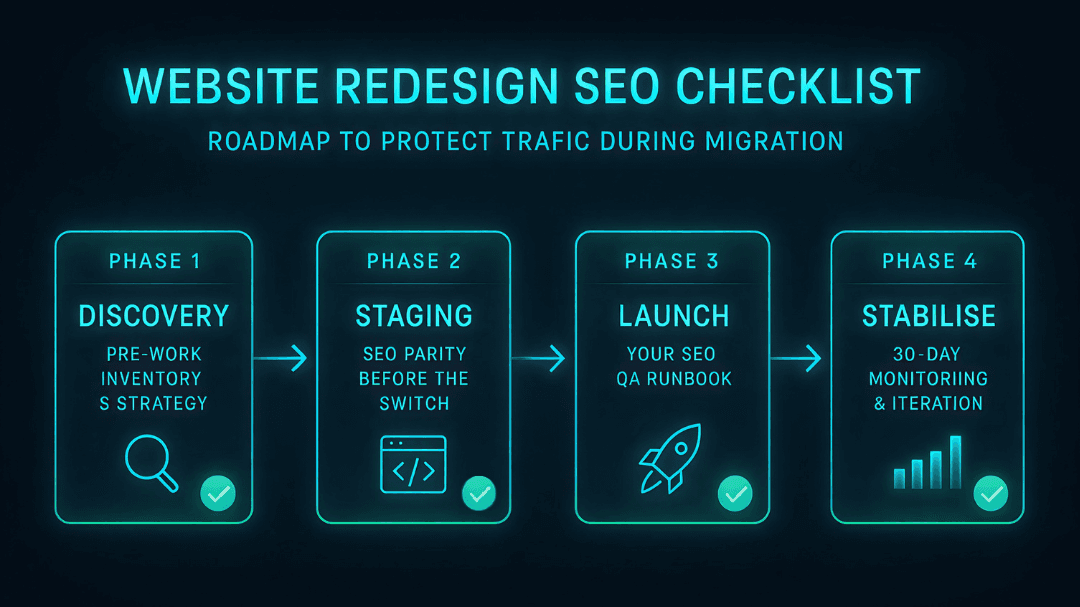
#Four phases, from the week before work starts to a month after launch. Tick items off as you go; each phase is explained underneath.
Before you start
Record what the old site earns
0 of 4 done
On staging
Build the new site without losing what ranks
0 of 6 done
Keep the same URL where you can. Redirect the rest to the closest match, not the homepage.
Launch day
Switch over and test
0 of 5 done
First 30 days
Watch, fix and leave the redirects alone
0 of 5 done
Before you start: record what the old site earns
#Export the evidence before anything changes, because once the old site is gone you can’t check what it was doing. In Google Search Console, export 12 months of pages and search queries. In Google Analytics, export your top landing pages and the enquiry events, such as phone taps and form sends. Keep both: in week 3 after launch, they’re what you compare against.
Then list every URL the old site has. A crawler is the quickest way; the free version of Screaming Frog’s SEO Spider crawls up to 500 URLs, which covers most small business sites. Add any URLs from your sitemap and Search Console that the crawl missed, then mark the pages that bring traffic, enquiries or links from other websites. Those are the pages you can’t afford to lose.
Map every old URL to a new one
#Every old URL needs a destination: the same URL if it still exists, otherwise the closest new page. Google recommends mapping old URLs to new ones and redirecting each one permanently on the server. Redirecting everything to the homepage throws away what each page ranked for.
Example redirect map for a plumber’s site
/our-services
- New URL
- /services
- Why
- Same page, new address
/boiler-repairs.html
- New URL
- /services/boiler-repair
- Why
- Same service, cleaner URL
/bathroom-gallery
- New URL
- /services/bathrooms
- Why
- Gallery merged into the bathrooms page
/blog/2019/winter-tips
- New URL
- /guides/frozen-pipes
- Why
- Old post merged into a newer guide
/contact-us
- New URL
- /contact
- Why
- Same page, new address
| Old URL | New URL | Why |
|---|---|---|
| /our-services | /services | Same page, new address |
| /boiler-repairs.html | /services/boiler-repair | Same service, cleaner URL |
| /bathroom-gallery | /services/bathrooms | Gallery merged into the bathrooms page |
| /blog/2019/winter-tips | /guides/frozen-pipes | Old post merged into a newer guide |
| /contact-us | /contact | Same page, new address |
Redirect straight to the final page. Google advises against chains and says that if you can’t avoid one, keep it short: ideally no more than 3 hops and fewer than 5. If an old URL was itself already redirecting somewhere, point it at the new final page instead of adding another hop.
Can you change URLs during a redesign?
#Yes, but only when there’s a reason, and every change needs a redirect. Keep the URLs of pages that rank well. Changing “/boiler-repairs.html” to “/services/boiler-repair” is worth it on a rebuild because the new structure will last; changing a URL because you prefer the wording rarely is.
301 or 308: which redirect should you use?
#Use either for a page that has moved for good. Google treats 301 and 308 the same way: both say a page has moved permanently, and both tell Google to show the new URL. The one difference is technical. A 308 tells the browser to resend a form submission or API request exactly as it was, while a 301 lets older browsers switch it to a plain page request. For normal pages that makes no difference.
So use whatever your platform gives you for a permanent redirect. WordPress redirect plugins and most hosts’ .htaccess rules send 301s. Next.js sends a 308 when a redirect is marked permanent, which is what our own site uses for articles we’ve merged. What matters is that it’s permanent and server-side.
# .htaccess on Apache (most WordPress hosts): a 301Redirect 301 /boiler-repairs.html https://www.example.co.uk/services/boiler-repair// next.config.js: permanent: true sends a 308async redirects() { return [ { source: '/boiler-repairs.html', destination: '/services/boiler-repair', permanent: true }, ];}Avoid 302s and JavaScript redirects for moved pages
A 302 or 307 is temporary, so Google doesn’t take it as a sign that the new page should replace the old one. JavaScript redirects are a last resort in Google’s own guidance, because Google may never see them if the page fails to render.
On staging: carry over what Google already understands
#Build the new site on a staging copy and check it against your export before anything goes live. For each page that ranks, keep the title, the H1 and the substance of the content unless the page’s purpose is changing. A new design can change how a page looks without changing what it says. Rebuild the internal links too: if your bathrooms page was linked from the menu and three service pages, it should be on the new site.
Copy across the details that are easy to miss: structured data such as LocalBusiness, image alt text, the business name, address and phone number in the footer, and any FAQ answers that showed in search. Then test the key pages on a phone, and run them through PageSpeed Insights so the new site is at least as quick as the old one.
Keep staging out of Google with a password
Google says robots.txt is not a way to keep a page out of its results; a blocked page can still be indexed if something links to it. Put the staging site behind a password, and make sure any noindex tag is removed at launch.
Launch day: switch over and test
#Turn on the redirects first, then test them by hand. Paste your top 20 old URLs into a browser and check each one lands on the right new page in one step. Check the live site has no noindex tag and that robots.txt isn’t blocking anything from staging. Submit the new sitemap in Search Console, then tap your own phone number and send a test enquiry to confirm Analytics records both.
For a small or medium site, move everything on the same day. Google recommends that over moving one section at a time, which suits bigger sites.
Changing your domain as well?
#Use Search Console’s Change of Address tool, but only after the redirects are live. It’s for moving to a new domain or subdomain, not for redesigns on the same domain, a switch to https or a change of host. You need to own both properties in Search Console, and Google asks you to keep the redirects for at least 180 days.
The first 30 days after launch
#Expect some movement. Google says rankings fluctuate during a move and that for a medium-sized site it can take a few weeks or more before the new URLs fully replace the old ones. Check Search Console’s page indexing report each week, fix any 404s that appear for old URLs, and compare traffic and enquiries for your top pages with the export you took before you started.
Update the links you control: your Google Business Profile, directory listings, social profiles and email signatures. Then leave the redirects alone. Google’s advice is to keep them for as long as possible, and at least a year. We leave them in place for good, because old links in emails and on other sites keep working.
If a page that used to bring enquiries is still down after a month, look at what changed: its URL, its title, its content or its links. If the answer is “nothing”, our guide to why websites fail covers the causes that have nothing to do with the redesign.
How we handle the SEO side of a redesign
#On every website redesign we crawl the old site, keep URLs that rank, map and redirect the rest, check titles, headings and structured data on staging, and check Search Console after launch. It’s part of the price, which follows our website packages from £400. Want to know where your current site stands first? Our free website check looks at speed, page titles, indexing, your Google Business Profile and how easy it is to get in touch, and comes back within 48 hours.
Website redesign SEO: common questions
#Will a website redesign affect my SEO?
It can, but it doesn’t have to. Drops after a redesign usually come from URLs that changed without redirects, ranking pages that were removed, or rewritten titles and headings. Map every old URL, redirect it permanently, carry over what ranks and check Search Console after launch, and most small sites keep their rankings.
How long does it take rankings to recover after a redesign?
Google says to expect fluctuation during a move, and that for a medium-sized site it can take a few weeks or more for the new URLs to replace the old ones. If a key page is still down after a month, check its redirect, title, content and internal links before assuming it will come back on its own.
Should I use a 301 or a 308 redirect?
Either is fine for a page that has moved permanently. Google treats 301 and 308 the same way. A 308 also keeps form submissions and API requests intact, which only matters for those, not normal pages. Use the permanent redirect your platform offers, and avoid 302s, which Google treats as temporary.
How long should I keep redirects after a redesign?
At least a year, and ideally for good. Google advises keeping redirects for as long as possible so it can pass the old pages’ signals to the new ones. Old URLs also live on in emails, directories and other websites, so removing redirects later sends those visitors to an error page.
Is a redirect map the same as a sitemap?
No. A sitemap lists the pages on your new site so Google can find them. A redirect map lists every old URL alongside the new URL it should send visitors to. You need both: the map before launch to set up redirects, and the new sitemap submitted in Search Console on launch day.
Do I need the Change of Address tool for a redesign?
Only if you’re moving to a different domain or subdomain. The tool isn’t for redesigns on the same domain, a switch from http to https, or a change of hosting. If you are changing domain, set up and test the redirects first, then use the tool, and keep the redirects for at least 180 days.
Redesigning your site and want to keep your rankings?
We crawl your old site, map and redirect every URL, check the SEO on staging and watch Search Console after launch. Fixed-price packages from £400.
Sources
URL mapping, redirects, chains, timing and how long to keep redirects — Google Search Central
Site moves with URL changes, updated August 2026
301 and 308 are permanent; 302 and 307 temporary; JavaScript redirects last resort — Google Search Central
Redirects and Google Search, updated April 2026
How 308 differs from 301 — MDN Web Docs
robots.txt doesn’t keep pages out of Google — Google Search Central
Change of Address tool: domain moves only, redirects for 180 days — Search Console Help
Free crawl limit of 500 URLs — Screaming Frog
- #website-redesign-seo-checklist
- #website-migration
- #redirects
- #301-vs-308
- #search-console
- #small-business-websites